WOnderful (g)Vim oCAML DEBUGger
(If you're wondering about the second "W" in the name ...
Yes!: it's a typo, it should be a "V", but the name is prettier
with the "W"  )
)
After trying hard to learn the few emacs keybindings I need in
order to use the OCaml debugger inside emacs ... I resigned and
decided to make ocamldebug
work with (g)vim too.
WOWcamldebug is the result.
 |
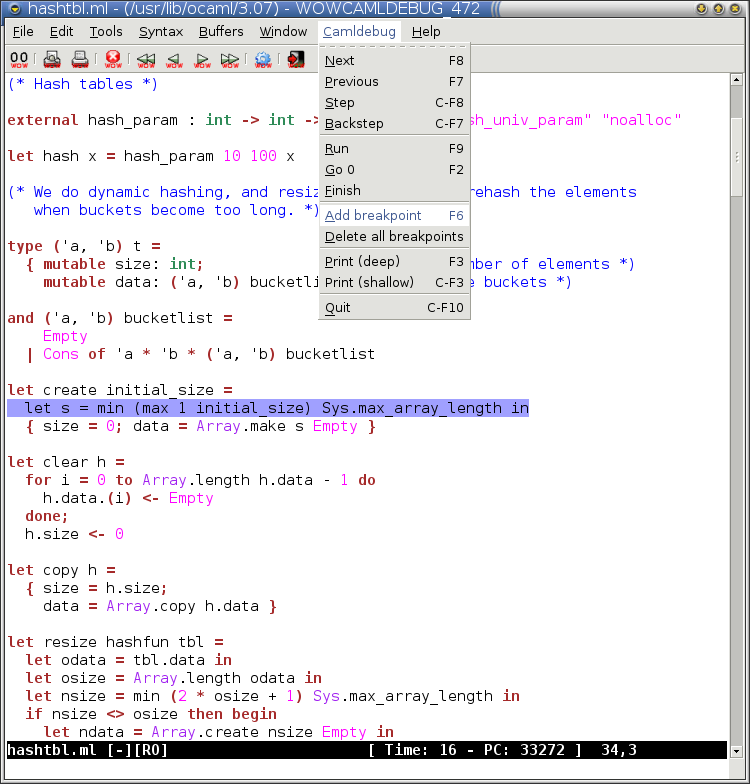 |
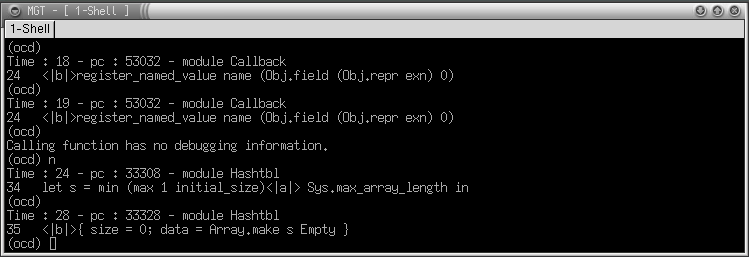
WOWcamldebug is a front end that permits to use the OCaml debugger within (g)vim. You can run it as you usually run ocamldebug and it will execute both the ocamldebugger itself, permitting usual interaction, and a gvim window which will be kept in sync with the current debugging position. The current debugging line is highlighted and the cursor is positioned at the current event position on that line.
Communication is possible in both directions: from ocamldebug to gvim and vice versa. You can simply avoid caring about wowcamldebug and use your ocamldebug terminal as usual. Alternatively you can use gvim and the provided (not that fancy ...) toolbar for ocamldebug interaction which permits the usual ocamldebug motion commands (next, step, backstep and previous) and more fancy actions like printing the identifier at cursor position.
In order to install WOWcamldebug you need to
download the tarball below; follow the instructions in the INSTALL
file for build and installation. Using
WOWcamldebug is trivial, just invoke it as you would have invoked
ocamldebug itself. Some additional options are
provided (e.g. -source) and documented via the
-help command line option.
Warning in order to use editor → debugger communication (all the gvim toollbar and menu commands need that) you will need one of:
- vim built with Python support
- the wowtell.ml utility (included in the distribution tarball)
which of the two methods is used is decided at runtime, with preference for the Python support, if available.
News
- [24/01/2008] Version 0.4 is out, ordinary maintenance release.
- More general Makefile which enables GODI users to specify where OCaml headers are.
- Change license to GPL v3.
- [19/08/2005] Fixed a setpgid issue which inhibit proper starting of wowcamldebug. Version 0.3 is out including this fix only.
- [09/02/2004] Finally WOWcamldebug has a release: version 0.2 is
out! New features includes:
- many bug fixes (like CTRL-D and CTRL-C ocamldebug's support)
- gvim (ugly) toolbar, improved key bindings and more available commands
- support for print and display command in gvim with "print identifier at position" semantics
- ocamldebug feedback in gvim's status line
- [06/02/2004] Added support for
-sourcecommand line option. Using it is now possible to specify an ocamldebug script file to be sources at startup - [19/10/2003] Added support for editor → debugger communications. All commands are available via gvim menus: a standard menu with commands for debugger control and a contextual one (right click) with command for adding breakpoint at the pointed line
Download
- Download wowcamldebug-0.4.tar.gz, it is distributed freely under the terms of the GNU General Public License.
TODO
- add side markers for brekpoints (cfr. agide)
- discover why current position highlight doesn't work on "let" keywords
- strange CTRL-C behaviour:
break_debuggerfunction is invoked once for each CTRL-C pressed, but ocamldebug prints "Interrupted" once the first time CTRL-C is pressed, twice the second one and so on ... - better display of current event: when clicking away to print values is easy to forget where the current event was
- feedback of ocamldebug questions on gvim side
BUGS
- wowcamldebug can't distinguish between ocamldebug output and debugged program output. Programs writing on stdout one of the ocamldebug prompts (see variable "prompts" below) can mess up debugging status. I know no solutions for this bug yet, feel free to suggest one ...

